Table of Contents
When you start using email marketing, you realise freebies are the best way to get new people on your list. So you created your first lead magnet. Then another. And another. Each time, you think “I’ll just create a quick welcome sequence for this one too.”
Before you know it, you’ve got five separate automations with five emails each (called a sequence). You’re spending more time managing your email sequences than actually creating freebies or offers that people want.
There’s a better way to handle your freebie automations. One that saves you time, keeps your messaging consistent, and actually creates a better experience for people who download multiple freebies from you.
Let me show you the automation structure I use (and teach my clients), which splits freebie automations into two simple parts instead of duplicating everything. (Automations are workflows that automatically handle tasks like sending emails, adding tags, checking conditions, and moving people through different steps based on their actions.)
The Freebie Automation Problem Nobody Talks About
Here’s what typically happens when you’re creating multiple lead magnets:
You create your first freebie, let’s say a “90 Day Business Planning Template.” You write a welcome sequence: five emails introducing yourself, explaining your approach, sharing your story, and showing people what you’re about.
Then you create a second freebie, maybe a “Profit First Budget Worksheet.” Now you need emails for this one too. So you write another welcome sequence. It’s similar to the first one, just tweaked slightly to reference budgeting instead of planning.
By the time you’ve got three or four freebies, you’re maintaining 15 to 20 emails that all say basically the same thing with minor variations.
But here’s the real problem: each freebie has its own complete automation. When someone downloads multiple freebies (which happens more often than you’d think), they go through multiple welcome sequences. They get your “welcome to me” message multiple times, hearing the same stories and introduction over and over. Not exactly the polished, professional impression you were going for.
Understanding Freebie Emails vs Welcome Sequences
Think about what you’re actually trying to accomplish with those welcome emails after someone downloads a freebie. They are getting the freebie delivered and then some emails about you. The key to smart freebie automation is understanding these are two different jobs.
The freebie emails are about delivering what they downloaded. These are specific to that particular resource – the delivery email with the download link, maybe a follow-up with tips on using that specific template or worksheet.
The welcome sequence is about THEM and how you can help them. It’s about understanding their challenges, showing them you get what they’re going through, and demonstrating how your approach can support them. Yes, they’ll learn about you, but the focus is on their journey and their needs.
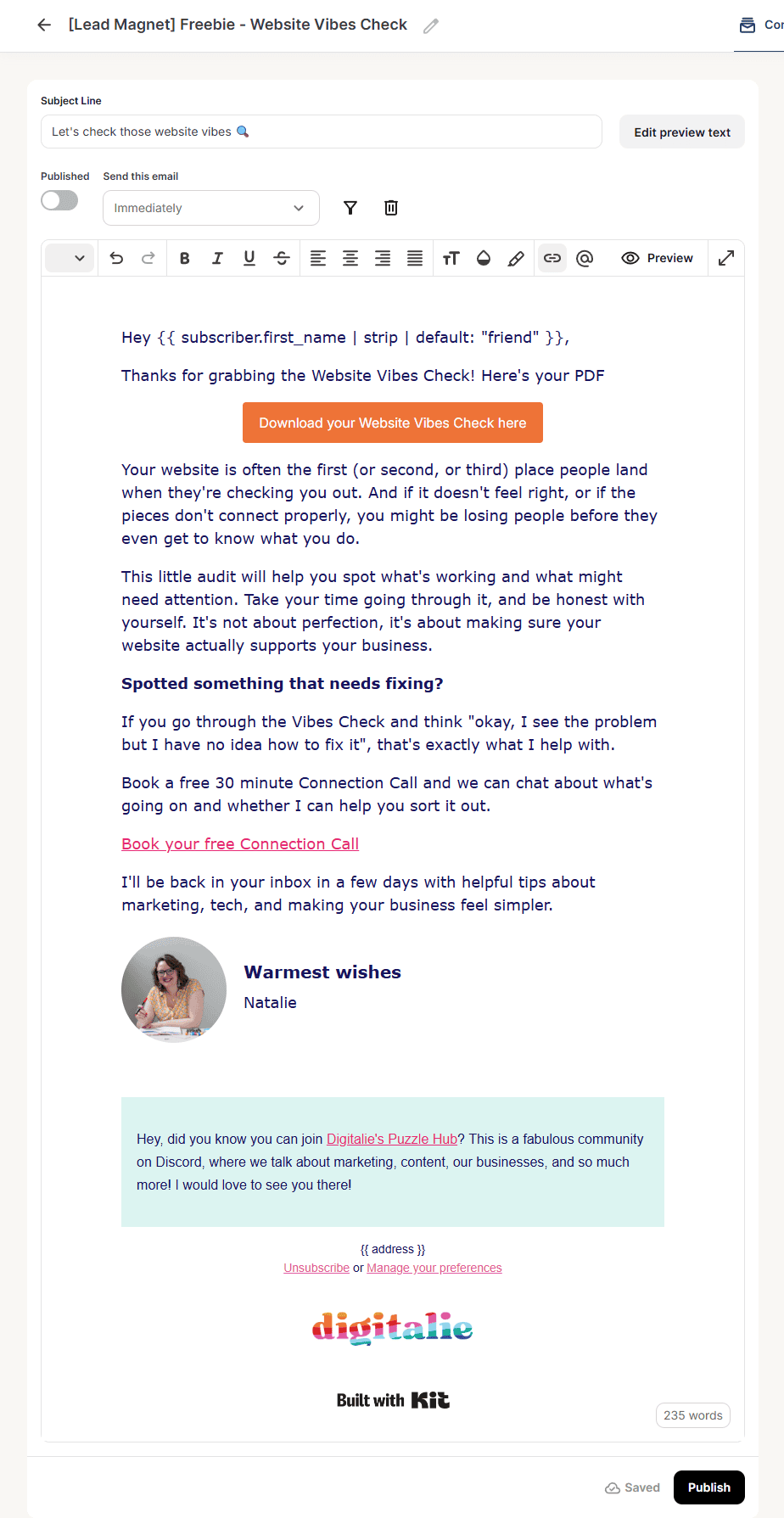
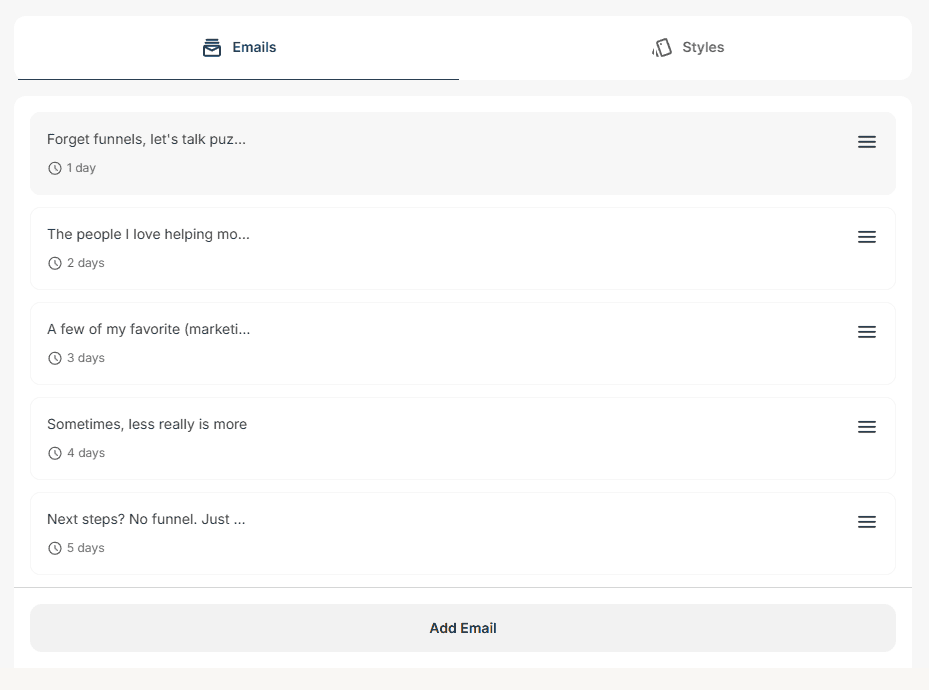
Whether someone downloaded your “90 Day Business Planning Template” or your “Profit First Budget Worksheet,” their core challenges are the same:
- They’re struggling with business clarity or planning
- They want practical support, not just theory
- They need to know you understand their specific situation
- They want to see how you can help them beyond this one freebie
None of that changes based on which PDF they grabbed.
The freebie delivery? That’s different for each resource. But the “understanding them and their needs” part? That stays the same.
The Smarter Way: Split Them Into Two Parts
Most people try to do both jobs in one set of emails for each freebie. They combine the delivery with the welcome, which means they end up duplicating the welcome part over and over.
Instead of combining these two jobs, split them into two distinct parts. This gives you much more control and makes everything easier to manage.
Part 1: The Delivery Sequence (unique per freebie)
This is short. Usually one to two emails maximum. It includes:
- The delivery email with the actual download link
- Maybe a follow up email with tips on using that specific resource
These emails are specific to what they downloaded. If they grabbed your “90 Day Business Planning Template,” you’re giving them tips on business planning. If they downloaded your “Profit First Budget Worksheet,” you’re talking about budgeting.
Part 2: The Welcome Sequence (shared across all freebies)
This is where you help them understand their challenges and show how you can support them. Usually four to six emails that cover:
- Understanding their situation and what they’re struggling with
- Your approach or methodology for helping them
- What they can expect from being on your list
- Stories that illustrate how you’ve helped others
- How you can continue supporting them beyond the freebie
Everyone gets this same sequence, regardless of which door they entered through.
So instead of five separate sequences with five emails each, you have:
- Five to 10 delivery emails (one or two per freebie)
- One welcome sequence (five emails, shared by everyone)
Much easier to manage. Much easier to update.
Want more help? Don’t worry, I’ve got you! Let’s connect and explore your options!
How To Set Up This Freebie Automation (In Any Email Platform)
The beauty of this two-part system is that it works with any email platform that supports automation. Not just in Kit, but also Mailchimp, ActiveCampaign, MailerLite, or any platform with automation and tagging:
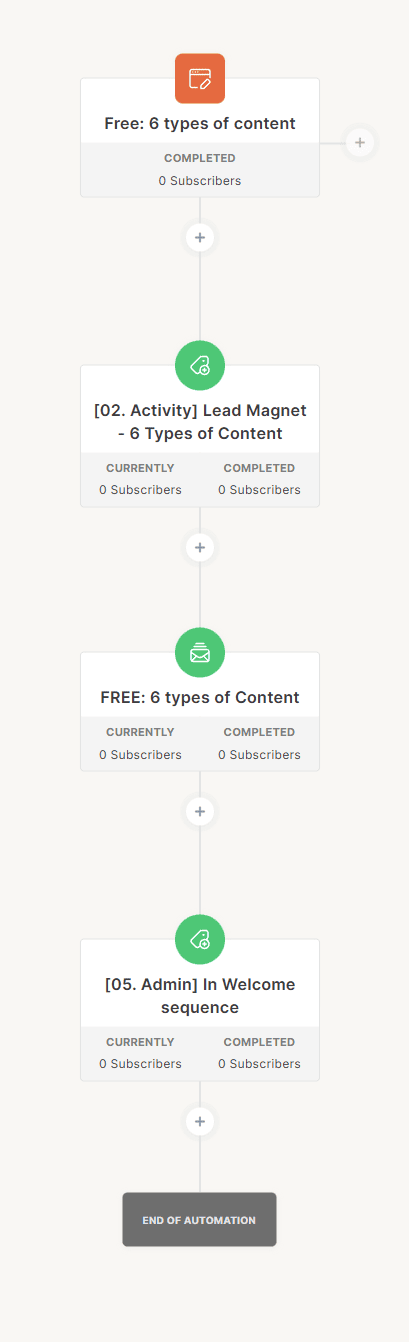
1. Create a delivery automation for each freebie
- Trigger (what starts the automation): When someone subscribes to your freebie form (or to a tag if you prefer)
- Send 1-2 emails with the download and tips
- Tag them with the specific freebie name
- Give them a tag to move to the welcome sequence (or move them to the automation if your platform allows)
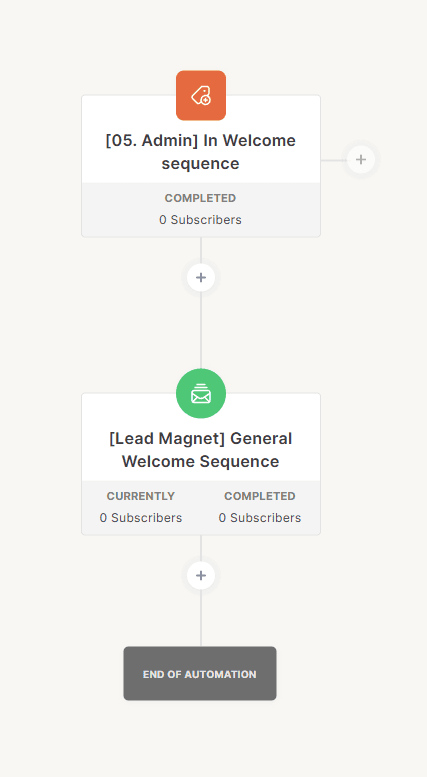
2. Create one separate welcome sequence automation
- Trigger: When someone gets tagged with that automation tag/gets moved here
- Send your 4-6 welcome emails
The Kit Advantage: Even Simpler with Reusable Sequences
If you use Kit, there’s an even more elegant way to set this up thanks to Kit’s reusable sequences feature.
In Kit, you can use the exact same email sequence in multiple automations. Not a copy, the actual same sequence. This means when you update one email, it updates everywhere automatically.
This means you can add the welcome sequence to each freebie automation.
Here’s how:
- Set up your first delivery automation, with trigger and delivery emails as normal
- Create your welcome sequence right inside this automation, but in a separate sequence after the delivery emails
- In any following freebie automation, set up the trigger and delivery emails for this freebie and when you get to the welcome sequence part, add the existing sequence you created in automation #1.
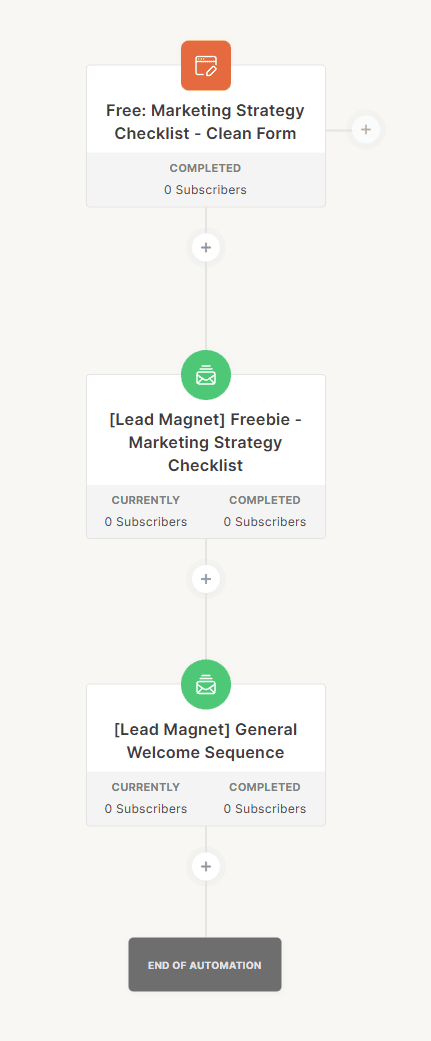
The brilliant part? Edit the welcome sequence once, and it updates across all your freebie automations. No copying, no syncing, no version control headaches.
What Happens When Someone Downloads Multiple Freebies
You’d think it doesn’t happen often, but you’d be surprised how many people want to download multiple freebies at once, or close one after the other.
Let’s say Sarah downloads your “90 Day Business Planning Template” and receives the delivery email about it. She received the full welcome sequence and a week later sees your “Profit First Budget Worksheet” and downloads that too. This time she gets your delivery emails about budgeting. And then what..
Well if you have set up your welcome email sequence so people can only receive the emails in it once, the system will recognise she’s already been through the welcome sequence and skip straight past it without getting duplicate welcome emails.
She’s now properly connected to both freebies she downloaded, but she only received your welcome sequence once. Much better experience for her, much less confusing messaging from you.
How to Prevent Duplicate Welcome Emails
Most email platforms have a built-in setting that prevents someone from going through the same sequence twice. In Kit, for example, you can set sequences to only be received once per subscriber. This handles the duplicate prevention automatically.
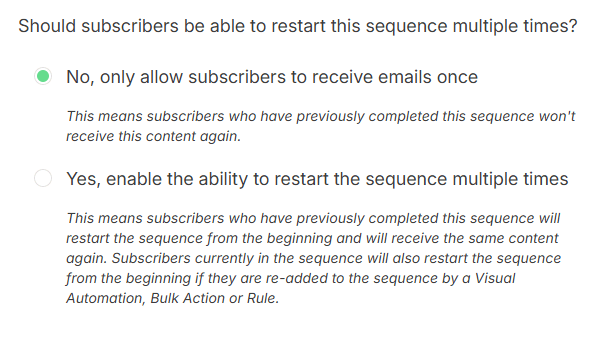
However, you might want to add tags for extra control and tracking:
Optional tag system:
- Tag them [Admin] In Welcome Sequence when they enter the welcome sequence
- Tag them [Profile] Finished Welcome Sequence when they complete it
- Use a condition to check for these tags before sending anyone into the welcome sequence. If they have it, they just leave.
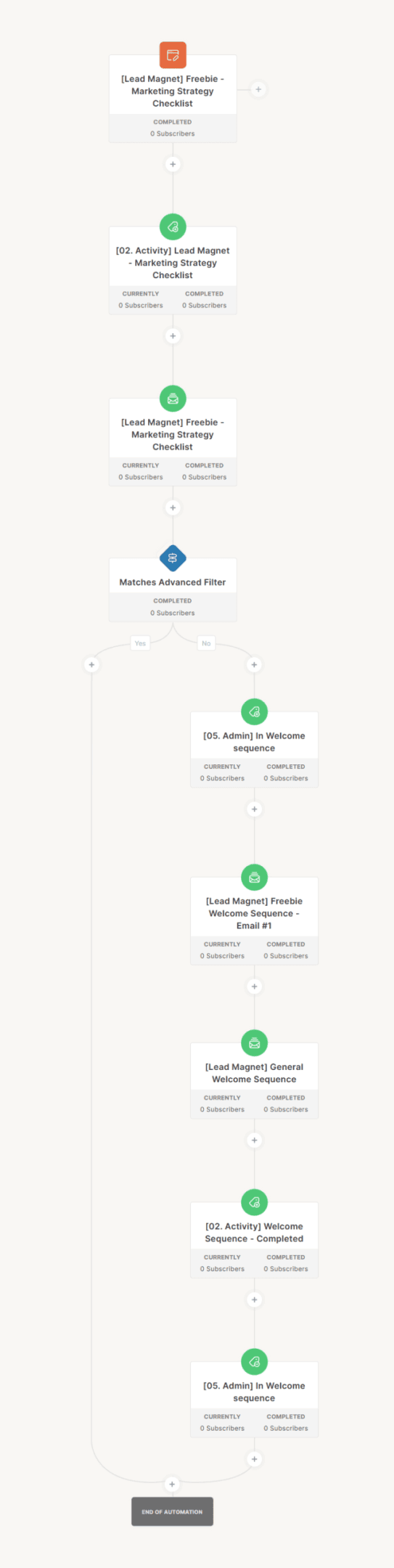
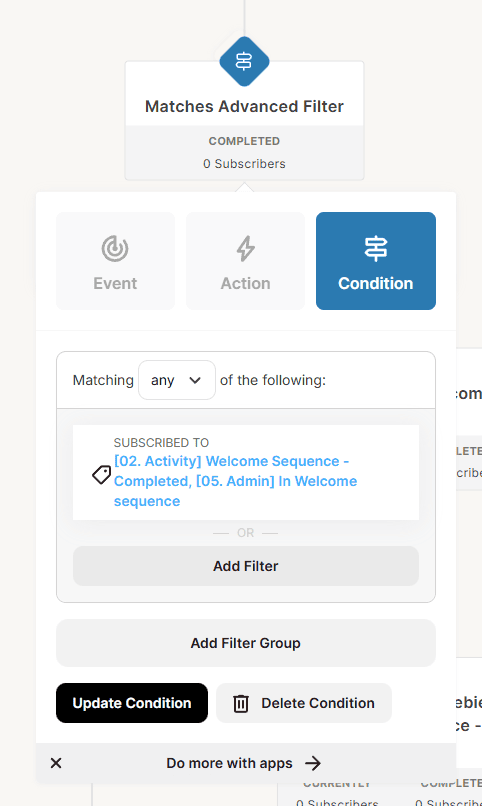
This gives you additional benefits:
- You can exclude people from newsletters while they’re in the welcome sequence
- You have a clear record of who’s been welcomed
- You can create segments based on welcome sequence completion
- Extra safety net if platform settings get changed accidentally
My recommendation: Use the built-in platform settings as your primary protection, and add tags if you want the extra tracking and segmentation options.
Why Use Two Different Admin Tags?
You might wonder why you need both [Admin] In Welcome Sequence and [Profile] Finished Welcome Sequence. Here’s the reasoning:
The “In Welcome Sequence” tag tells you someone is currently going through your welcome emails. This is useful if you want to exclude these people from your regular newsletter while they’re getting to know you (though this is optional, you can send them your newsletter too).
This tag gets removed at the end of the automation.
The “Finished Welcome Sequence” tag tells you someone has completed the whole welcome journey. This is your permanent record that they’ve been welcomed.
Making This Even Smarter with Conditional Content
Once you’ve got this basic structure working, here’s a clever way to use those freebie tags: conditional content in your welcome sequence.
Remember, you’re tagging everyone with which freebie they downloaded: [Lead Magnet] Business Planning Template, [Lead Magnet] Profit First Budget Worksheet, etc.
In your welcome emails, you can use conditional content blocks. These show people different freebies based on what they haven’t downloaded yet.
For example, in Email 3 of your welcome sequence:
I know running a business can feel overwhelming when you’re trying to juggle everything at once. I’ve created a few free resources to help you get organised:
- [If they DON’T have the Budget Worksheet tag] My Profit First Budget Worksheet helps you set up a simple budgeting system
- [If they DON’T have the Planning Template tag] My 90 Day Business Planning Template breaks down your goals into actionable steps
- [If they DON’T have the Client Onboarding tag] My Client Onboarding Checklist makes sure you don’t miss critical steps with new clients”
This way, everyone only sees resources they haven’t already downloaded. No awkward “here’s something you already have” moments.
Most email platforms support conditional content:
- Kit: Use conditional content blocks
- ActiveCampaign: Conditional content blocks
- Mailchimp: Conditional merge tags
- MailerLite: Show/hide content based on conditions
This turns your welcome sequence into a personalised experience without creating separate sequences for every possible combination of downloads.
Is figuring this out making you a little bit crazy? Trust me, I understand. And I’m here to help!
Ready to Set This Up?
This freebie automation structure works whether you have 2 freebies or 20. If you want to start setting this up, look at your current freebies and their emails.
Step 1: Audit what you have
- List all your freebies and their current email sequences
- Identify which emails are delivery/freebie-specific vs welcome/introduction emails
Step 2: Create your unified welcome sequence
- Write a welcome sequence that could work for all those freebies
- Focus on the subscriber and their challenges, not on the specific freebie
- Optional: Add conditional content to suggest other freebies they don’t have yet
Step 3: Update your freebie automations
- Remove the welcome/introduction emails from each freebie automations
- Keep only the delivery emails (the freebie download and any tips specific to that resource)
- Optional: Add a condition to check if they’ve already been welcomed
Step 4: Add the welcome sequence
- Add the new welcome sequence to each freebie automation (Kit method)
- OR set up a separate welcome automation triggered by a tag (Universal method)
Step 5: Test it
- Subscribe to one of your freebies with a test email
- Make sure you get the delivery emails AND the welcome sequence
- Subscribe to a second freebie with the same test email
- Confirm you only get the new delivery emails, not the welcome sequence again
Need Help Getting This Set Up?
Email automation is powerful, but I’ll be honest, it can make your brain twist into knots sometimes. I’ve been doing email marketing for a long time, and I always draw diagrams to map out automation logic.
If you’re reading this thinking “I’ve got the steps but I don’t want to figure this out on my own,” that’s completely normal. Sometimes it’s just faster and easier to have someone look at your specific setup and say “Here’s exactly what you need to do.”
That’s what I do. I help business owners set up their email systems so they actually work without creating more confusion.
If your email automations are getting messy, or you’re not quite sure how to structure your sequences, or you just want someone else to handle the technical setup so you can focus on your business, book a free connection call. We can figure out together what would help most, whether that’s a strategy session, hands-on setup help, or a full migration to get everything organised properly.