

Table of Contents
This article contains affiliate links. If you purchase a product or service through an affiliate link of mine, I may receive a commission or incentive. There is no additional charge for you.
An artist I spoke with a few weeks ago had just gone viral. Thousands of new followers in a few days, video views climbing, the kind of moment most people work years for. And almost straight away, a small panic: how do you actually use this? Where should all these people go?
It’s the right question to ask, because none of it is really his. The followers, the views, the reach, they all sit on someone else’s platform. If the algorithm shifts next week, or the account gets flagged, or the app simply decides to show his posts to fewer people, that audience can thin out overnight, and he doesn’t get a say.
It doesn’t take a viral week for this to matter. Whether your audience arrived in a rush or trickled in slowly over the years, if they only exist on social media, they’re not really yours. A steady, quiet following is just as exposed as a viral one. The size of the moment changes, the risk doesn’t.
The first move is to get those people onto your email list, where you can actually reach them. But there’s a second place worth having: somewhere they can gather and connect the way they do on social media, except you own it.
That’s where a platform like Circle comes in. A community you host on your own terms, more engaged than a feed because people come to take part rather than scroll past, with your courses, memberships and events in one place that belongs to you. It sits alongside your email list rather than replacing it. Email is how you reach people. The community is where they gather, connect, and buy. (I’m a Circle affiliate, because I recommend it, not the other way round.)
When an all-in-one community platform actually makes sense
You don’t need anything elaborate to start. A community can begin almost anywhere: a Discord server, a Facebook group, a free tool you already have. But those come with limits. They can be clunky, they don’t always show your posts to everyone, and your courses or membership usually sit on a separate platform.
That’s what an all-in-one community platform is for. Your members get one place for everything: they talk to each other, join calls with you, and find their courses without leaving. And on the right plan, new people are added automatically when they pay, rather than you moving everyone across by hand.
The patchwork can look cheaper, because each piece is affordable on its own. The real cost hides in the joins: the Zapier subscription, the afternoon you lose when something stops syncing, and the separate tool prices that quietly add up. I’ve written before about automating the small tasks that eat your week, and the more tools you’re bridging, the more there is to keep maintaining.
So an all-in-one platform earns its place when your community, your courses, and your tiers are for the same audience.
But not everything belongs in one platform
“All-in-one” doesn’t mean putting everything you own in one place because you can. It means putting the things that belong together in one place, and being just as clear about what should stay where it is. For me, the clearest line is email.
I keep email marketing in a dedicated email tool, and I wouldn’t move it inside a community platform however neat the bundle looks. Kajabi, for instance, builds email right in, and plenty of people are happy with that. I’m not, and it’s worth saying why. Email is its own craft: deliverability, automations, segmentation, keeping a list healthy. Dedicated email tools are built around getting those right, and a community platform, however good, isn’t.
There’s a bigger reason too, and it goes back to where we started. Your email list is the one audience you genuinely own. It’s how you reach people wherever they are, including the ones who drift away from the community. I don’t want that list tucked inside another tool, where leaving later means prising it loose from everything else.
You don’t have to choose between them, though. Circle connects to Kit, so the two work together: email doing the reaching, the community doing the gathering, each in the tool built for the job. That’s the setup I’d point you towards, and a good part of why Circle is the platform I recommend. So let’s look at what it actually is.
What Circle actually is, and what it's like to set up
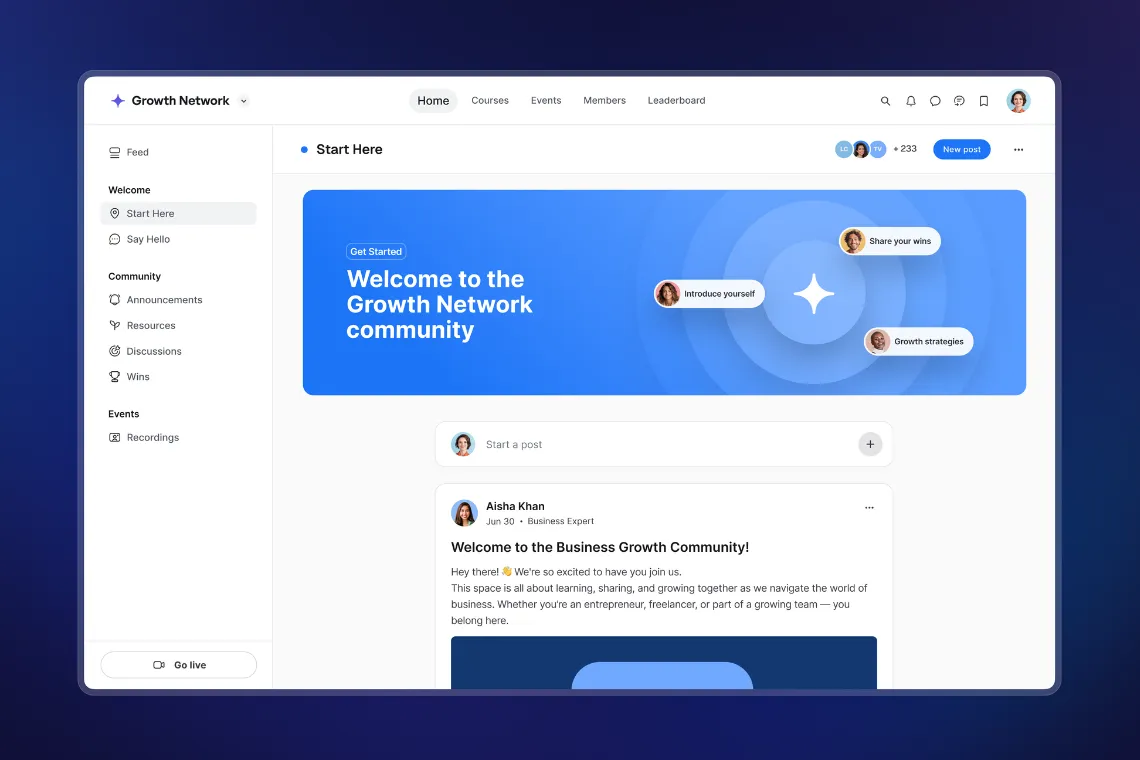
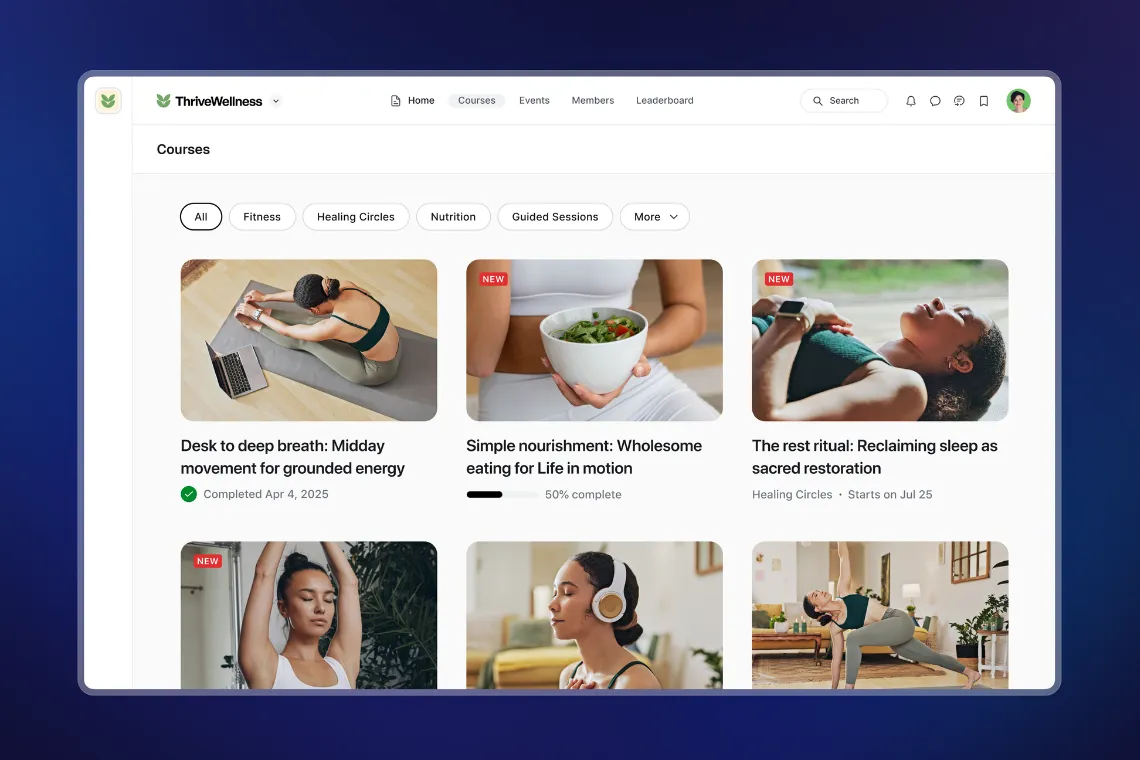
There’s more built in than you might guess. You can run live streams and workshops without bolting on Zoom, keep an events calendar people can RSVP to, host your courses as proper lessons rather than a folder of videos, and take payments through Stripe for one-off purchases or ongoing memberships. Members get their own profiles and can message each other, so it feels social rather than like a filing cabinet for content.
Setting it up is more approachable than you’d expect. No community platform is completely effortless, because a community has moving parts by nature, but Circle is one of the easier ones I’ve worked in. You create your spaces, then decide who sees what. That control by tier is where it gets clever. I set up a Circle membership platform for a client with three tiers: a free tier to welcome people in, and two paid tiers above it. Members on the top tier see everything. Members on the free tier see a smaller slice, just the parts their tier includes. Building that was a matter of deciding which spaces belonged to which tier, not wrestling with anything technical.
That ease matters more than it sounds, because getting the setup right the first time is most of the battle. And it’s not only my view. As one client said after I moved her across, “She’s made my migration from ActiveCampaign to Kit and Teachable to Circle so much easier.” However, setting up has just become easier still with their newest updates.
The newest additions: Circle AI and Eclipse
In June 2026, Circle launched Eclipse, a redesign that puts AI right at the centre of building your community. It lands squarely on the part most people find fiddliest, which is the building itself.
The shift is this: instead of clicking through settings to build everything by hand, you describe what you want and Circle builds it. Ask it to set up a three-tier membership community with a free onboarding space and two paid tiers, and it doesn’t hand you a tutorial. It creates the spaces, sets who can access what, and builds the paywalls, updating in real time as you watch. That three-tier setup I built by hand earlier? This does it for you.
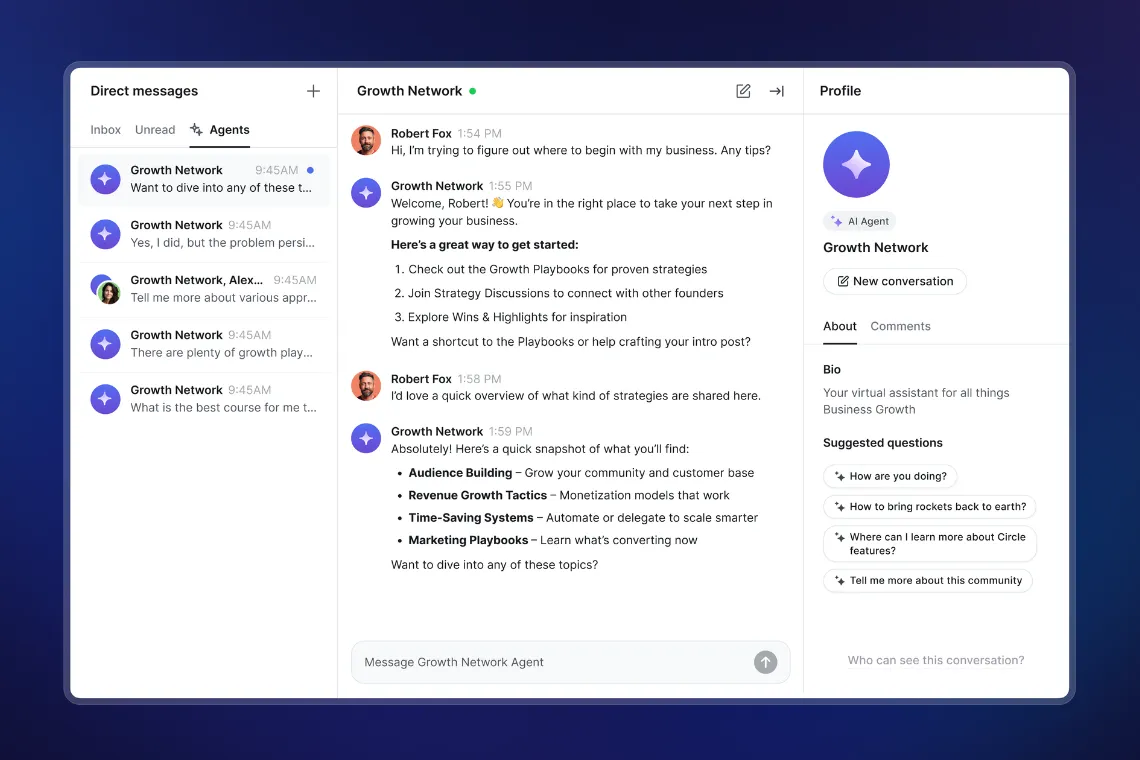
There’s more in the same release. A content co-pilot helps you write and rewrite posts, summarise a long announcement, or translate something for international members. AI agents can answer members inside your community, working from a knowledge base you control, so you decide exactly what information they can access. Activity scores give each member a simple engagement rating, so you can see who’s leaning in and who’s drifting away. And AI workflows take the repetitive admin off your plate. Circle even connects directly to AI assistants like Claude and ChatGPT now, through an emerging standard called MCP, so you can check on your community or make small changes just by asking, rather than logging in at all.
One honest caveat, because this matters. AI that builds for you is genuinely useful, but it still needs you to know what you want. It’s a brilliant assistant, not a strategist. You still decide what your tiers are, what belongs in each, and how someone moves between them. The AI just saves you the clicking once you’ve made those calls. Some of the more advanced AI features also sit on the higher plans, which brings us to an important element of communities: the costs.
What Circle costs, and whether it's worth it
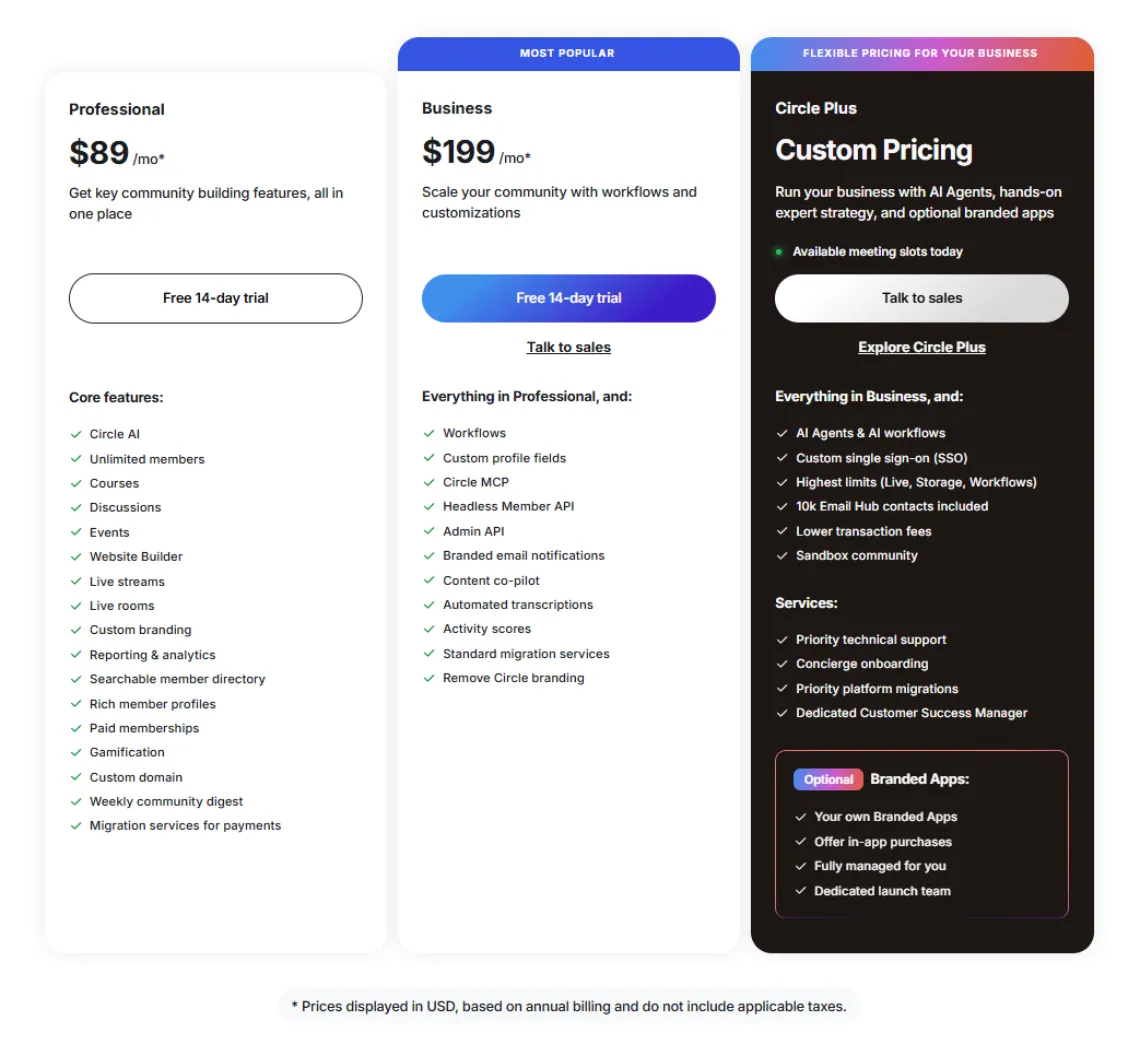
The Professional plan is $89 a month. It’s a solid home for a community, courses and tiers, but it doesn’t include automation, workflows or API access, and it carries a 2% fee on what you sell through it. It can be a good way to start but since you would still be adding people by hand if you use anything else as a payment platform, and you can’t connect it to other tools like Kit (Zapier and the API both need Business), you will quickly grow out of it.
The Business plan is $199 a month. This adds automation, workflows and API access, and drops the transaction fee to 1%. That API access matters more than it sounds, because it’s what lets Circle connect directly to your email platform. If you want Circle and Kit properly talking to each other, this is realistically the tier you need.
Above that sits Circle Plus, custom priced and usually starting around $360 a month. It adds the AI agents and workflows, the fully branded mobile app, and the lowest fees.
So is it worth it? Put the Business plan next to what it replaces: a course tool, a separate community tool, a Zapier subscription to join them, and the hours you’d spend keeping all three talking. Total that up honestly and one joined-up platform often costs about the same or less, while asking far less of your time. Worth it, then, depends more on whether you have enough of an audience to fill it.
Still not sure if Circle is for you? I’d love to chat! 😊
Who Circle is right for, and who it isn't
Most of the time, when someone asks me “should I be on Circle?“, the answer is yes. If you want your community, your courses and your tiers in one place. Especially if you want to be selling courses soon, Circle is where I’d point you. Having it all under one roof from the start saves you a painful migration later. (If you’re still weighing up your wider tech stack, my post on choosing the right tech tools for your business is a good place to think it through.) And if you already have your courses somewhere else, but you get Business for a year, Circle will actually move those courses for you.
The people I steer away are the ones who want a completely free community and are on a tight budget. There’s no shame in that, it’s simply not what Circle is for, and paying $89 a month for something you’d hoped to run for nothing makes no sense. I have a wish to set up a community for a side project I’m doing where I won’t be making any money from and so Circle isn’t right for that. But for Digitalie, it sure is.
By the way, there aren’t many people I would recommend use the payment options within Circle. I have one client who does use it but most of them actually use another payment platform for taking payment and then use the API options (which is why Business is so helpful) to send them to Circle.
If Circle sounds like your kind of home, you can take a look at it here and try it before you commit. And if the setup is exactly the sort of thing you know you’ll keep putting off, that’s what Tech Hours are for. Getting tools like this set up and connected is a good chunk of what I do for clients, so you don’t have to lose your evenings to it.
Build something that's yours
Here’s what it really comes down to. The audience you’ve worked for shouldn’t live only on a platform that can change the rules on you overnight. A community you own puts that back in your hands: a home for your people that’s yours to keep.
If your community, your courses and your tiers belong together, Circle brings them under one roof beautifully. Start where you are, keep it as simple as it needs to be, and build something no algorithm can take away.